What Is an RFID Card? Frequencies, Uses and Testing
A practical introduction to contactless cards for attendance, door access and authorised identification systems.
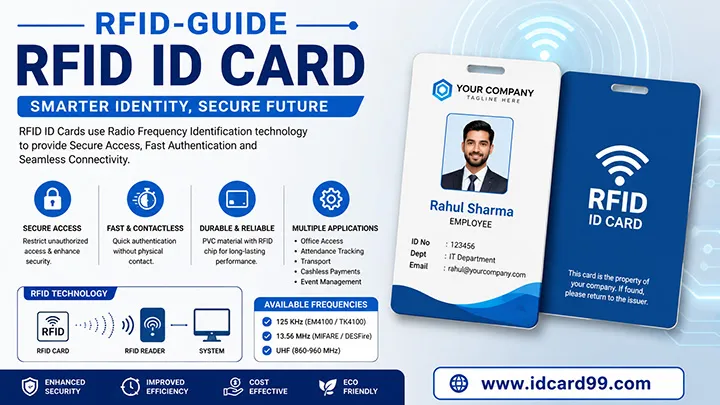
RFID stands for Radio Frequency Identification. An RFID card normally contains an integrated circuit and an antenna inside a plastic card body. When it enters the field of a compatible reader, the reader and card exchange the information needed by the connected system.
The card does not make an access decision by itself. In a typical installation, the reader sends credential data to a controller or attendance device. The configured software or controller checks whether that credential is enrolled and what permissions apply. The system may then record attendance or release an electric lock.
RFID Is Not the Same as Wi-Fi
An RFID card does not normally join a Wi-Fi network. It communicates over the RFID frequency supported by the card and reader. A door controller or attendance machine may later send records through a wired network, Wi-Fi or the internet, but that network connection belongs to the system, not to the passive card.
What Is Inside an RFID Card?
- Integrated circuit: stores an identifier and, depending on the chip, additional memory or security functions.
- Antenna: receives energy and exchanges radio signals with the reader.
- Card body: protects the internal components and provides a printable surface when the selected product supports printing.
Most card-shaped credentials used for attendance and door access are passive: they are energised by the reader field and do not need a user-replaceable battery.
125 kHz, 13.56 MHz and UHF Compared
| Category | Frequency | Typical behaviour | Common applications |
|---|---|---|---|
| LF | Typically 125 kHz | Short-range credential reading; many basic systems use a fixed card identifier | Legacy attendance and door-access installations |
| HF | 13.56 MHz | Short-range contactless operation with several different chip families and capabilities | Access control, libraries, transport, attendance and NFC-related applications |
| UHF | Region-dependent bands around 860-960 MHz | Potentially longer reading distance with suitable tags, antennas and installation | Vehicle identification, logistics and controlled long-range applications |
These categories are not interchangeable. A 13.56 MHz card cannot be assumed to work simply because another 13.56 MHz card works. Chip family, protocol, keys, data structure and reader configuration can still differ. UHF reading distance also depends heavily on the reader power, antenna, tag design, mounting and local regulations; a single distance claim is not reliable for every installation.
RFID and NFC: Related but Not Identical
NFC operates at 13.56 MHz and belongs to the wider family of RFID technologies, but the terms RFID and NFC should not be treated as names for one universal card. NFC-capable phones can interact with supported NFC tags and applications at close range. A phone does not automatically read every 125 kHz access card, and an NFC tag does not automatically replace a secured building credential.
For a website, WhatsApp, Google Review or digital business-card link intended for compatible smartphones, an appropriate NFC product may be suitable. For an existing attendance or door system, the correct choice is the card proven to work with that reader and software. See the NFC card guide for more detail.
Common Authorised Uses
- Employee attendance and shift records
- Door access for permitted office or factory areas
- School staff or student systems where compatible readers are installed
- Library issue and return workflows
- Parking or vehicle identification with the appropriate technology
- Hotel, gym, hospital or membership systems configured for a supported credential
The card is only one component. Reader placement, controller wiring, software enrolment, permissions and an electric lock or attendance terminal determine what the complete system can do.
Why Reader Compatibility Must Be Tested
A visible card number or similar appearance does not prove compatibility. Before ordering, identify the existing reader, frequency, chip family and software. If those details are unavailable, provide an authorised working sample and arrange testing with the system administrator.
For a bulk order, one sample should be tested for reading, enrolment and the expected action. A door test should confirm permitted and denied access. An attendance test should confirm that the correct employee record and time entry appear in the software. Sample success should be recorded before printing and encoding the full quantity.
Printing Employee or Student Details
A compatible RFID card can also serve as a visible identity card when its surface and printing method are suitable. Common printed details include the organisation name and logo, cardholder photo, name, designation or class, employee or student code, blood group and validity. Glossy or matt appearance may be available depending on the material and process.
The printed employee code and the electronic credential number may be different values. The authorised administrator must enrol the correct electronic credential against the correct person in the software. Proof-check the visible data separately from the electronic test.
Lost Cards, Validity and Deactivation
When a card is lost, the organisation should promptly disable or delete that credential in its authorised attendance or access-control system. Printing "invalid" on a record or changing a visible expiry date does not disable the chip. A replacement card should be newly enrolled and the old credential should remain blocked.
Time-based and area-based permissions should be managed in the controller or software by the responsible administrator. Former employees and expired temporary visitors should not retain active access.
Security Depends on the Complete System
RFID cards do not all provide the same security. Some older systems rely mainly on a readable identifier, while other chip and reader combinations support stronger authentication. Security also depends on enrolment practice, key management, controller configuration, lost-card response and physical door security.
Do not choose a card only because it is described as "smart" or "encrypted." Ask the authorised system provider which credential is supported and what protection is actually configured. IDCard99 does not assist with unauthorised copying, cloning or entry.
Questions to Answer Before Ordering
- What is the reader manufacturer and model?
- Which frequency and chip family does the system support?
- Does the card need only enrolment, or also encoding?
- Will a photo, logo and variable employee data be printed?
- What quantity is required now and for later replacements?
- Who will test and approve the sample in the real system?
- Who has authority to enrol, block and manage credentials?
Frequently Asked Questions
Does an RFID card use Wi-Fi?
No. An RFID card communicates with a compatible RFID reader by radio frequency. The wider attendance or access system may use a network, but the card itself does not connect to Wi-Fi.
Do passive RFID cards need a battery?
Most card-shaped RFID credentials used for attendance and door access are passive. They receive energy from the reader field and do not contain a user-replaceable battery.
Will any RFID card work with any reader?
No. Frequency alone is not enough. The chip family, protocol, card number format, reader, controller and software configuration must be compatible. Test a sample in the actual authorised system before a bulk order.
Can a photo and employee details be printed on an RFID card?
Yes, when the selected card surface and printing process are suitable. A company logo, photograph, name, designation, employee code and other approved details can be printed without changing the need for electronic compatibility testing.
What should happen when an RFID card is lost?
The authorised administrator should disable or remove that credential in the attendance or access-control system and issue a newly enrolled card. The physical printed details alone do not deactivate the electronic credential.
Can IDCard99 copy or clone an existing access card?
No. We do not assist with unauthorised cloning, copying or access. Compatibility and enrolment work must be approved by the organisation that controls the reader and software.
Related Resources
Read about RFID card printing and sample testing, compare access-control cards, review NFC card uses, or learn what affects an ID card quotation.
Need an Authorised RFID Card Sample?
Send the reader model, frequency, chip requirement, printing details and quantity. Sample testing should be completed before a bulk order.
Contact IDCard99 View RFID Card Information