How to Make an ID Card
A complete practical guide for making school ID cards, employee ID cards, visitor badges, event cards and organization identity cards with the right details, design, photo, material and proof checking process.
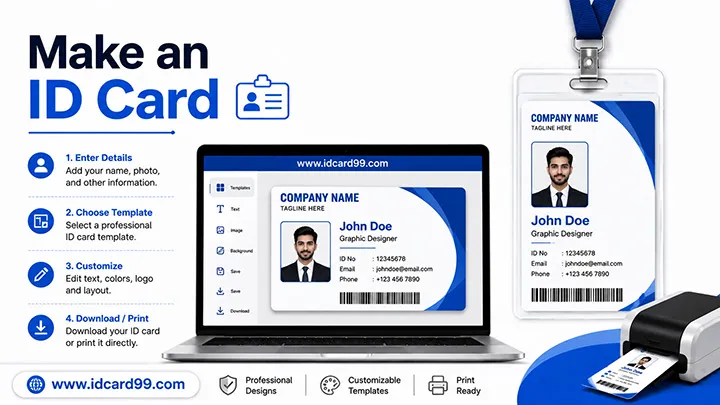
Making an ID card involves choosing the right card size, preparing the required details and photo, creating a readable design, and checking the final proof before printing. The exact process depends on whether you need a school ID card, employee ID card, visitor badge or event pass.
To make an ID card, first collect the approved name, photograph, identification number and other necessary details. Next, choose a suitable template or design tool, arrange the information clearly, and review the preview at the intended card size. Correct spelling, photo quality and alignment before downloading or sending the design for printing.
You can create a single card using a suitable online ID card generator or design software. For schools and companies preparing cards in bulk, organized spreadsheet data may help reduce manual entry, provided the software supports the required import workflow.
1. Understand the Purpose of the ID Card
Before making an ID card, identify who will use it and what it needs to do. A school ID card may help identify a student and their school, while an employee ID card can show a person's name, role, department or employee number. Visitor badges and event passes can help staff identify authorized visitors and participants.
For schools, the card details should follow the school's requirements. Depending on the purpose, these may include the student's name, photograph, class, student or GR number, school name and an approved contact number. Emergency contact details should be included only when appropriate and authorized by the school.
For companies, employee cards may display the employee's name, photograph, designation, department and employee number. Access permissions should be managed through the organization's approved system; a printed card alone does not automatically grant access or verify employment.
Visitor and event cards may include the visitor's name, host or department, visit date, event name or validity period. Choose only the fields needed for identification and entry management, and avoid displaying unnecessary personal information.
2. Decide Which Details Should Appear on the Card
The information on an ID card depends on its purpose and the organization's requirements. Choose the details needed to identify the cardholder and support the card's intended use. Keeping the layout simple helps people read the important information quickly.
- Cardholder name: Use the correct full name and check the spelling.
- Photograph: Add a clear, recent photo when identification by photo is required.
- Organization: Include the school, company or organization name and its logo where appropriate.
- Role or class: Add the student's class, employee's designation, department or participant role when needed.
- Identification number: Use the student ID, GR number, employee number or visitor reference required by the organization.
- Validity information: Include an issue date, expiry date or visit date if relevant to the card's purpose.
- Contact details: Add an approved organization or emergency contact number only when necessary.
- QR code or barcode: Include one when the organization has a system that uses it, and test that it scans correctly.
- Additional information: Address, blood group or vehicle number should be included only when there is a clear need and proper authorization.
Before finalizing the design, confirm the required fields with the school, employer or organization. Avoid printing unnecessary personal information, and make sure the name, photograph and identification number are easy to read at the final card size.
3. Choose a Clean and Readable ID Card Design
A good ID card design should make the most important information easy to identify at a glance. The cardholder's name, photograph and identification number should be clearly visible at the final printed size. Avoid adding decorative elements that make essential details difficult to read.
Choose the Right Layout
A horizontal layout can work well when the card needs space for a name, photograph and several details in one row. A vertical layout may be suitable when the photograph and information are arranged from top to bottom. Choose the orientation based on the amount of information and how the card will be carried or displayed.
Use Readable Fonts and Colours
Choose a clear font and maintain strong contrast between text and its background. Use a consistent font style and size hierarchy for headings, names and supporting details. Check small text at the actual card size instead of relying only on how it looks on a large computer screen.
Place the Logo and Important Details Carefully
Use an approved organization logo and keep it clear without stretching or distorting it. Arrange the photograph, name, ID number and other required fields with consistent spacing. Keep important text away from the edges so it is less likely to be affected by trimming during printing.
Confirm the Final Card Dimensions
Before preparing the final artwork, confirm the finished card size and printing requirements with the organization or printer. The commonly used ID-1 card size is 85.60 × 53.98 mm. If a different size or layout is required, follow the specifications for that project.
For more guidance, see our PVC ID card layout guide for card design and size considerations.
4. Use a Clear Photo and Crop It Properly
A clear photograph helps people identify the cardholder. Choose an image in which the face is visible, well lit and in focus. Follow the school's or organization's photo requirements, including any rules for the background, clothing or image dimensions.
Crop the Photo Without Distorting It
Position the face comfortably within the photo area and leave suitable space around the head. Crop the image to fit the ID card template rather than stretching it to fill the space. Stretching can distort facial features, while an unsuitable crop may cut off part of the head or face.
Use a Suitable Image Resolution
Start with a sufficiently clear original image. For printed ID cards, prepare the artwork according to the final card dimensions and the printer's resolution requirements. A 300 DPI setting is commonly used for print artwork, but the actual result also depends on the source image's pixel dimensions and quality.
Check the Photo in the Final Design
After placing the photo in the template, review it at the intended printed card size. Check that the face remains clear, the crop looks natural and the photo is not covered by text, borders or other design elements.
You can use our online image crop tool to prepare a photo before adding it to an ID card design.
5. Choose the Right ID Card Material
The right ID card material depends on how often the card will be used, how long it needs to last, the available budget and the printing method. Temporary event badges may have different requirements from school or employee cards used every day. Confirm the material and finish before preparing the final design.
Paper ID Cards
Paper or card-stock badges can be suitable for short-term events, temporary visitor passes and low-budget identification needs. The paper weight, lamination and cutting method should be selected according to the intended use. Paper cards may not be as durable as purpose-made plastic cards, particularly when exposed to moisture or frequent handling.
PVC ID Cards
PVC cards are commonly used for school, employee, membership and other identification purposes where a durable plastic card is required. The finished quality depends on the card stock, printing method, lamination or surface finish and production process. Confirm the required card dimensions and finish with the printer before approving the artwork.
Glossy and matte finishes provide different appearances. Choose a finish that suits the design and intended use, and check that names, photographs, logos and small text remain clear on the finished card.
RFID and NFC Cards
RFID or NFC cards may be appropriate when an organization needs compatible contactless identification, attendance or access-control functions. The required chip type, frequency, reader compatibility and software support must be confirmed before ordering. A card's appearance alone does not establish that it will work with a particular system.
Lanyards, Holders and Accessories
Lanyards, card holders, pouches and clips can make cards easier to carry and display. Choose accessories according to the card dimensions, how the card will be worn and the user's requirements. For schools, offices and events, confirm the required lanyard width, attachment style, colour and printing before placing a bulk order.
Before confirming production, ask the supplier to clarify the material, finish, accessories, quantity and any personalization requirements so the quotation matches the intended card.
6. Check the Proof Carefully Before Printing
Before printing an ID card, review the final proof carefully. A proof is a preview of the design and cardholder details used to identify mistakes before production. For bulk orders, approval is especially important because the same error can be repeated across many cards.
Check the Organization Details
Confirm the organization name, logo, address, phone number, email and website wherever they appear. Make sure the logo is clear and that contact details are current and correctly spelled.
Verify Each Cardholder's Information
Check each person's name, photograph, class or designation, identification number and other required fields against the approved records. Confirm that each photograph belongs to the correct person and that no details have shifted into the wrong field.
Review Size, Alignment and Print Quality
Confirm the finished card dimensions, orientation, margins and readability. Important text should not be too close to the edges. If possible, inspect a sample at the actual printed size to check small text, photograph quality, colours and alignment.
Test QR Codes and Barcodes
If the card includes a QR code or barcode, scan a printed sample with a compatible reader and confirm that it leads to the intended information or system. A code that looks correct on screen may still be difficult to scan if it is too small, blurred or poorly printed.
Approve the Final Proof Before Production
For school or company orders, share the proof with the authorized person responsible for checking the details. Record any corrections, review the updated proof and obtain approval before printing the full batch. Keep the approved version so it can be used as a reference if questions arise later.
7. Avoid Common ID Card Design Mistakes
Small design or data-entry mistakes can make an ID card difficult to read or cause problems during printing. Review the layout and cardholder details before approving the final design.
- Incorrect information: Check names, identification numbers, class, designation and contact details against the approved records.
- Low-quality photographs: Avoid blurry, poorly lit, stretched or incorrectly cropped photos.
- Small or unclear text: Use readable fonts and check important details at the actual printed card size.
- Poor colour contrast: Make sure the text stands out clearly from the background.
- Incorrect card dimensions: Confirm the required width, height and orientation before preparing the artwork.
- Text too close to the edges: Keep important details within the printer's recommended safe area to reduce the risk of trimming.
- Overcrowded design: Include only the information needed for the card's purpose instead of filling every available space.
- Untested QR codes or barcodes: Scan a printed sample and verify that it works with the intended system.
- Skipping proof approval: Review the final proof and obtain approval from the authorized person before bulk printing.
- Unauthorized identity cards: Create cards only for legitimate, authorized purposes and never use a design to misrepresent identity or authority.
A simple final checklist can prevent many avoidable mistakes: verify the information, inspect the photograph, confirm the card size, review readability and approve the final proof before production.
8. Use an Online ID Card Generator When It Saves Time
An online ID card generator can help you prepare a card by entering details, uploading a photograph and choosing a suitable layout. It can be useful for creating a sample card, testing a design or preparing individual cards without arranging every element manually in design software.
Steps to Make an ID Card Online
- Choose a suitable ID card template or generator.
- Enter the required name, identification number, role or other approved details.
- Upload a clear photograph and the organization logo if needed.
- Review the preview for spelling, photo placement, alignment and readability.
- Download the finished design if the tool supports downloading, or follow its printing instructions.
- Check the design at the intended card size before printing.
Preparing ID Cards in Bulk
Schools and companies preparing many cards may organize cardholder information in a spreadsheet. Some ID card applications support importing data from Excel or CSV files, while other workflows require manual entry. Confirm that the selected software supports the required fields, photographs and data format before starting a large batch.
For bulk production, check a sample card and verify the imported names, photographs and identification numbers before printing the full batch. Keep personal information secure and share the data only with authorized people.
Authorized Use Only
ID cards should be created only for authorized schools, companies, offices, events, trusts, groups and organizations. Fake school ID cards, fake company ID cards, fake press cards, fake police cards, government-style misleading cards or unauthorized identity cards should not be created.
Related Resources
Frequently Asked Questions
What details are needed on an ID card?
Most ID cards include a name, photograph, identification number, class or designation, and organization name. Contact details and validity information may be included when needed. Emergency contact, address, blood group, QR code or barcode should be added only when appropriate for the card's purpose.
How do I make an ID card online?
Select an ID card template or generator, upload a clear photo, add the required details, check the preview and download the final card if the tool supports downloading.
What photo is best for an ID card?
A clear face photo with a plain background is best. The photo should be cropped correctly and should not be stretched.
Can I make ID cards from Excel data?
Yes. For bulk orders, Excel data can be saved as CSV and imported into suitable ID card software or design workflows that support data import.
Is fake ID card creation allowed?
No. ID cards should be created only for authorized and genuine organizations. Fake, misleading or unauthorized identity cards should not be made.
Conclusion
Making a professional ID card requires correct details, a clear photo, readable design, proper material selection and careful proof checking. A simple, practical and authorized ID card is more useful than an overcrowded design.
For schools, companies, events and organizations, a good ID card improves safety, identity verification, staff management, visitor tracking and professional branding.
Need Professional ID Card Printing?
Contact IDCard99 for PVC ID card printing, student ID cards, employee cards, visitor badges, RFID cards, NFC cards, lanyards and bulk card orders.
Contact Us