PVC ID Card Layout Size Guide
Professional PVC ID card design setup for Photoshop and CorelDRAW.
Learn correct PVC card dimensions, bleed area, safe zone and 300 DPI print-ready workflow used by professional ID card printing companies.
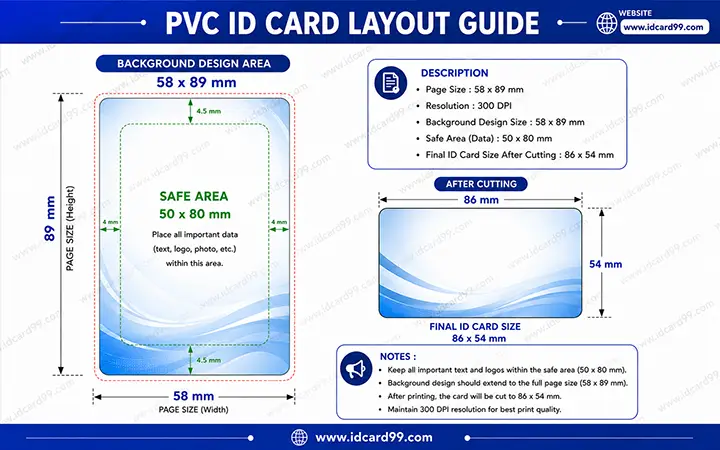
PVC Card Design Setup
- Horizontal layout: 1051 × 685 px
- Vertical layout: 685 × 1051 px
- Final card size: approx. 86 × 54 mm
- Resolution: 300 DPI
- Software: Photoshop & CorelDRAW
What is a PVC ID Card Layout?
A PVC ID card layout is the professional design setup used for creating print-ready employee cards, student cards, visitor cards and membership cards.
Proper layout setup is extremely important in PVC card printing because incorrect bleed area or wrong dimensions can cause text cutting, alignment problems and printing issues.
Professional designers use Photoshop and CorelDRAW to create PVC ID card files with correct bleed margin, safe text area and high-resolution export settings.
Important Layout Warning
Do not design a single PVC ID card directly on A4 or Letter size. First create the card artwork in the exact PVC card layout size, then arrange multiple cards on an A4 sheet only for printing. Wrong page size can create alignment problems when printing 10 cards on one sheet.
PVC ID Card Design Process

Create New File
Start by creating a new file at 300 DPI. Use 1051 × 685 px for a horizontal PVC ID card layout and 685 × 1051 px for a vertical PVC ID card layout. Open the file in pixels instead of millimeters to avoid rounding differences.

Add Bleed Area
Extend background colors and design elements up to the full artwork edge. Avoid adding an outer border or stroke on the background edge because it can increase the artwork size by 2 to 4 pixels and create alignment issues.

Maintain Safe Zone
Keep important text, logos, photos, QR codes and barcodes inside the safe area. A practical safe area is about 85% to 90% of the card artwork, for example around 945 × 600 px inside a vertical 685 × 1051 px card. This keeps the main data safe after cutting.

Export Print-Ready File
Export the final design in high-quality JPG, PDF or print-ready format using proper resolution and color settings. Avoid sending heavily compressed images because they can reduce print quality.
Understanding PVC Card Dimensions
Open File Size
The complete design file includes bleed area used for safe cutting and professional printing alignment. Create the file in pixels and keep the size exact.
- Horizontal: 1051 × 685 px
- Vertical: 685 × 1051 px
Final Card Size
Final printable PVC card size after cutting and finishing process. This is close to the international CR80 card size used for ATM cards, credit cards and ID cards.
- Horizontal cut area: about 1016 × 638 px
- Physical size: about 86 × 54 mm
Benefits of Proper PVC Layout Design

Accurate Printing
Proper dimensions improve printing accuracy.
Safe Cutting
Bleed area prevents white borders after cutting.

Better Alignment
Text and photos stay properly aligned.

Professional Output
High-quality print-ready design workflow.
PVC Card Printing Materials and Finishes
PVC ID cards can be printed using different materials depending on the required quality, durability and order quantity. We provide fusing PVC sheet printing with lamination, NT PVC sheet printing with upper lamination and PVC lamination material that gives the ID card a clean and professional finish.
Common finishing options include glossy finish, matte finish, sand texture finish and other special textures for suitable bulk orders. The right material and finish help the card look better, last longer and stay suitable for daily use in schools, offices, factories, events and organizations.
PVC Sheet Printing
Fusing PVC and NT PVC sheet options for professional ID card printing.

Lamination Finish
Glossy, matte and special texture finishes for clean and durable card output.
Common PVC Card Design Mistakes
- Designing without bleed area
- Using low DPI images
- Keeping text too close to card edges
- Using very thin fonts or text smaller than practical print size
- Exporting compressed low-quality files
- Wrong card dimensions
- Incorrect safe area usage
- Poor image quality
- RGB and CMYK mismatch problems
- Using very light colors or white text where the printer cannot reproduce it clearly
- Designing the card directly on A4 or Letter size
- Checking proof in large size instead of actual 86 × 54 mm size
Best Software for PVC ID Card Design
Photoshop is widely used for image editing and high-quality photo management while CorelDRAW is commonly used for vector-based PVC ID card layouts and professional printing workflow.
Both applications are suitable for employee ID cards, student ID cards, visitor cards and membership card design creation.
While designing, keep fonts bold and readable. Very thin fonts, very small text and light colors may look clear on a large screen but can become difficult to read after printing at actual card size. If possible, check the proof at the real 86 × 54 mm card size before final approval.
Related Pages
Frequently Asked Questions
What is the standard PVC ID card size?
Standard PVC ID card size is generally 86 × 54 MM.
Why is bleed area important in PVC printing?
Bleed area helps avoid white borders after cutting and improves printing accuracy.
Which DPI is best for PVC card printing?
300 DPI is recommended for professional PVC ID card printing.
Which software is best for PVC card design?
Photoshop and CorelDRAW are commonly used for professional PVC ID card layout creation.
Need Professional PVC ID Card Printing?
We provide professional PVC card printing, RFID cards, NFC cards and custom ID card solutions for schools, offices and businesses.
Contact Us