Employee ID Card PSD Template Free Download
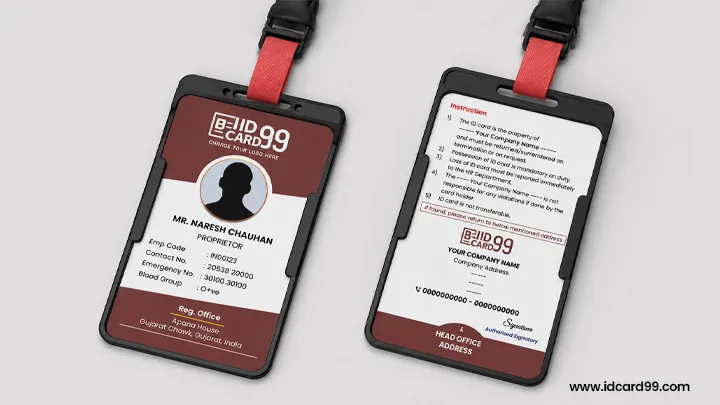
Download a free vertical employee ID card template with separate editable Front.psd and Back.psd files for Adobe Photoshop.
The design uses a 685 × 1051 pixel canvas at 300 DPI and includes a round employee photo area and editable company and employee details. Customize both sides, then check the text, photo placement and safe margins at actual print size before approving the card for printing.
Download Employee ID Card Template
The free ZIP package includes Front.psd, Back.psd and a Read-Me-First text file. Extract the ZIP after downloading, then open the PSD files in Adobe Photoshop to customize the card design and employee details.
Download Template
Editable Front and Back Employee ID Card PSD
This free employee ID card template is a vertical Photoshop design prepared on a 685 × 1051 pixel canvas at 300 DPI. The ZIP contains separate front and back PSD files, so company branding and employee information can be edited without rebuilding the card layout from the beginning.
You can change the background colours, fonts, company name, logo, office addresses and employee fields. The front design uses a 300 × 300 pixel round photo area, which can be replaced with a rectangular photo frame when required. The supplied Google Font references include Montserrat, Poppins and Roboto, helping you keep the typography consistent when text is changed.
The PSD files have no watermark and may be customized for legitimate commercial ID card printing.

Editable Employee and Company Details
The front layout can include the employee name, designation, employee code, contact number, emergency number, blood group and photo. You may add or remove fields according to the company-approved card format, while keeping the text readable at the final printed size.
The back layout includes space for company instructions, the registered office address, head office address and an authorized signatory. Replace the sample wording with the company’s approved instructions and verify every address, phone number, email address and website before printing.
How to Edit the PSD in Photoshop
- Download and extract the ZIP package.
- Open Front.psd and Back.psd in Adobe Photoshop.
- Delete the sample logo and place the authorized company logo in its position.
- Select the appropriate colour layer to apply the company’s approved colour palette.
- Type or paste the company name, addresses and employee details into the relevant text layers.
- Replace the signature with an authorized PNG or a clean JPG on a white background.
- Install the referenced Google Fonts if Photoshop reports a missing font.
- Review both sides at actual print size before exporting the final artwork.
Print Size, Safe Area, Fonts and Photo Quality
The vertical working canvas is 685 × 1051 pixels at 300 DPI. This pixel canvas should not be confused with the final trimmed PVC card size. Before printing, confirm the required physical card dimensions, bleed and trimming settings with your printer, and keep the employee photo, company logo and important text within the safe-area guides provided in the PSD. Background artwork may extend to the edges where the printing workflow allows it, but critical information should remain clear of trimming areas.
Use a clear, readable font and avoid very thin text. A nominal 7 pixel font may still be too small with some typefaces, so always print one card at its actual physical size and check readability before producing a full batch. White or light-coloured text should generally use sufficient weight and contrast against its background.
Crop the employee photograph to the required composition instead of stretching it. Keep the face clear, maintain the original proportions and use a good-quality source image. Resizing a low-resolution photo cannot restore missing facial detail.

Proof Checking Before Employee Card Printing
Check the fixed company information first because one error in the master layout can appear on every employee card. Verify the company name, logo, registered and head office addresses, phone numbers, email, website, instructions and authorized signature.
Then verify each employee’s name, code, designation, contact number, emergency number, blood group and photograph. Dates imported from Excel require special attention because day-month-year values can sometimes be interpreted as month-day-year. Send an actual-size PDF or image proof to the authorized company representative and begin production only after approval.
PVC Cards, Paper Cards, Holders and Lanyards
After customizing the employee ID card PSD, you can use the approved design for PVC or paper card printing. IDCard99 also offers employee card holders and lanyards for organizations that need a complete ID card setup. Confirm available options and printing requirements before placing an order.
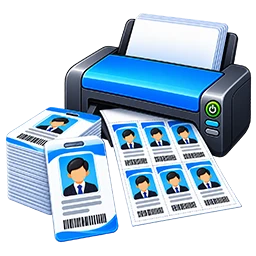
Custom Design, Excel Data and Bulk Printing
Companies that need a different layout can request a custom employee card design. Bulk cards can also be prepared from an organized Excel or CSV data sheet after field names, date formats and photo matching rules are confirmed. A sample card should be approved before the complete batch is printed.
For custom employee ID card printing or bulk orders, contact IDCard99 to confirm available services, delivery locations and applicable charges.
Authorized Use Policy
This template is provided for legitimate company and employee identification. IDCard99 does not knowingly produce fake, misleading or unauthorized cards. Requests involving government departments, police, press or other controlled identities require an authorization letter and may be declined if authority cannot be verified.
Related Templates & Tools
Official Photoshop Website
Frequently Asked Questions
Is this template completely free?
Yes. The ZIP contains free editable front and back PSD files without a watermark.
Can I edit the template?
Yes. You can edit the company branding, colours, fonts, addresses, instructions, signature, employee fields and photo frame in Photoshop.
Is it suitable for PVC printing?
Yes, the layout is optimized for professional PVC card printing.
What size is the vertical PSD template?
The working canvas is 685 × 1051 pixels at 300 DPI. Keep all important data inside the safe area and verify one actual-size print before bulk production.
Can I use it for commercial employee card printing?
Yes. The template can be customized for legitimate commercial employee ID card printing. It must not be used for fake, misleading or unauthorized identification.
Which files are included?
The download contains Front.psd, Back.psd and a Read-Me-First text file with supporting information.
Need Professional ID Card Printing?
Contact IDCard99 for employee ID card printing, PVC cards and RFID smart card solutions.
Contact Us Free ID Card GeneratorSupport Our Free Tools
If our free tools, templates and resources helped you, you can support us with a small contribution.
Support Us