Professional Visitor ID Card Generator
Create visitor ID cards online for offices, factories, schools, hospitals and corporate buildings.
Upload an approved company logo, check the numbered badge preview and download the completed JPG.
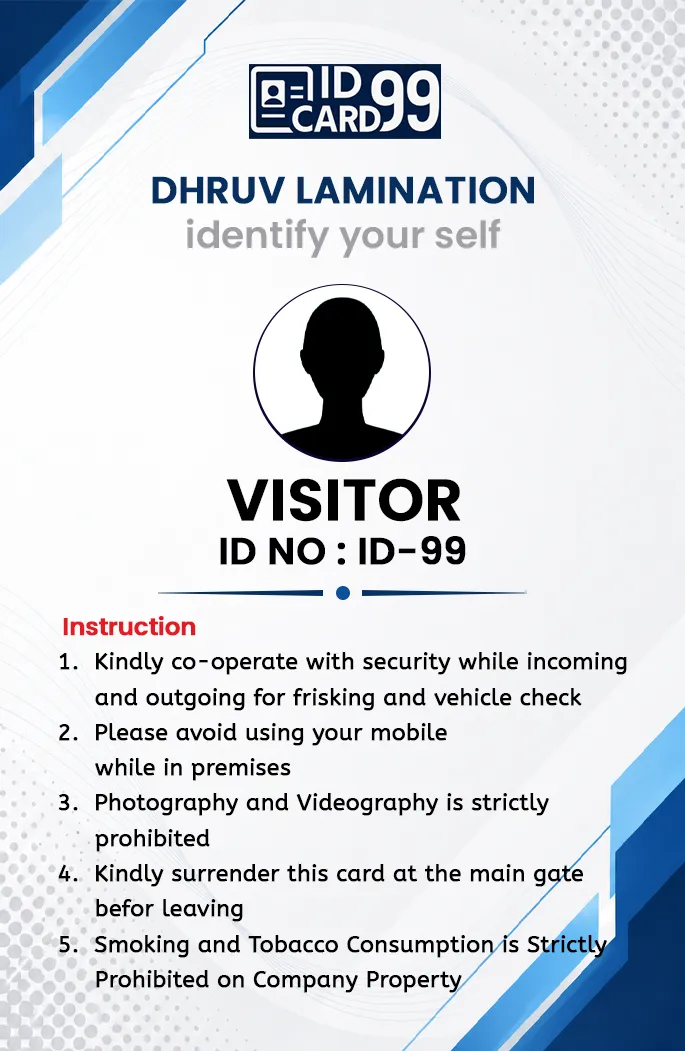
Free Visitor ID Card Generator Online
Create professional visitor ID cards online with company logo and visitor ID number for offices, schools, factories and corporate security systems.
Professional Visitor Badge Maker
This free visitor ID card generator is intended for authorized reception and security teams that need a simple, numbered temporary badge. It can support visitor identification at offices, factories, schools, hospitals, event venues and other controlled premises.
The current form supports an approved company logo, company name, an optional second line and a visitor ID number. Its limited fields keep the badge easy to identify from a distance.
Assign visitor numbers through your organization's own reception process. Before issuing a badge, record the visitor according to local policy and confirm that the badge number matches the relevant entry.
Before downloading or printing a visitor badge, confirm that the organization has approved the logo, visitor ID format and usage policy.
What Details You Can Add
The visitor card form supports company logo, company name, optional second line and visitor ID number. This keeps the badge simple and readable for reception desks, security counters and event entry points.
How to Prepare a Visitor Badge
Upload the approved organization logo, enter the company name and optional subtitle, assign the visitor number and generate the preview. Check the branding and number before downloading or printing the badge.
Best Practices for Visitor Badges
Use visitor badges for temporary identification only, and follow your organization's visitor management rules. For higher security, combine visitor cards with a sign-in register, QR code system or access control process.
For real use, visitor badges should normally include a clear visitor number, company branding and a defined issue process at reception or security entry. This helps staff identify temporary visitors without confusing the badge with permanent employee or student ID cards.
Frequently Asked Questions
Is the visitor ID card generator free?
Yes. The current visitor badge generator can be used without a design charge.
Can I upload my company logo?
Yes. Upload a company logo only when you have permission to use that organization's branding.
Can I download the generated visitor card?
Yes. Check the visitor number and company details in the private preview, then download the completed 685 × 1051 pixel card as a JPG image.